
Time Tracker desktop widget
5pm Time Tracker is a desktop widget that can be used to record time spent on tasks and then log it directly into 5pm.
It works on both PC and Mac platforms and can be installed from this page: http://www.5pmweb.com/feature_timetracker.php
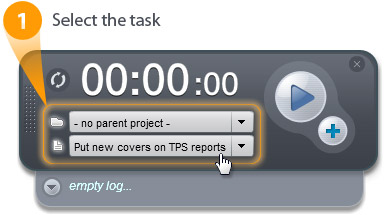
Time Tracker is very simple to use. Once you login, pick the task you are working on (can be changed later):
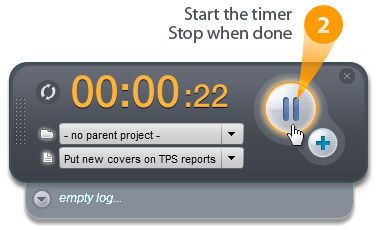
Start the Time. Stop or Pause when needed:
When you are ready to log the time into 5pm, click the "+" button:
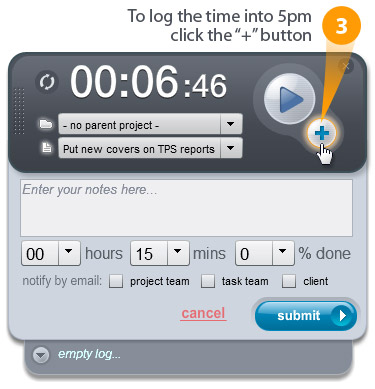
You can make adjustments to your time log before you submit it.
Once you click "Submit", a Progress Report will be added to the selected task in 5pm:
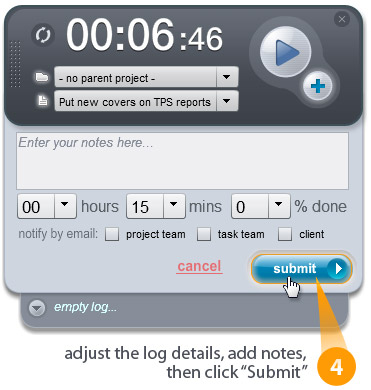
That's it!
Since you can edit the logs before you submit them, you can submit logs at any time, recording time spent in the past, for example, that you forgot to time with the widget.
You can also drag the widget around your desktop, hide it (minimize to system tray or dock panel), see the logs history, etc:
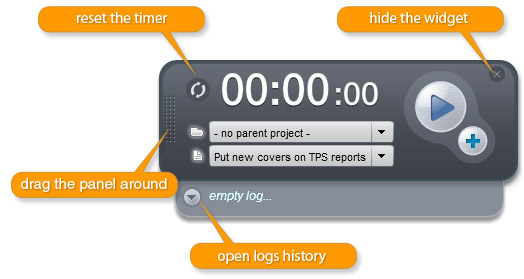
The(x) button from top right does NOT close the widget - it simply hides it from the screen. You will see a (5) icon in your system tray (PC, bottom right, by the clock) or dock panel (Mac) - to show the widget again, simply click on the icon. This way you can still run the Time Tracker in background. To close the widget (exit the app) - use the right click on (5) icon in the tray/dock.