You can send email notifications to the project and task team, or just specific people, when you
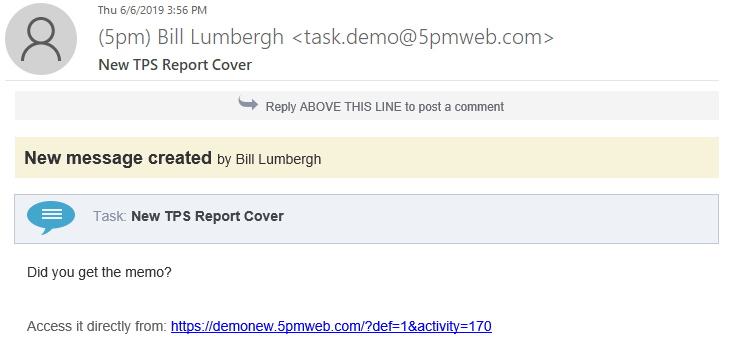
create or edit projects, tasks, messages, etc.:
And the best part is that the recipients can simply reply to a 5pm email notification,
as they reply to any other email, and their answer will be logged back into 5pm as a message!
You can also create from email Tasks, assign teams, attach files, add messages
and report progress.
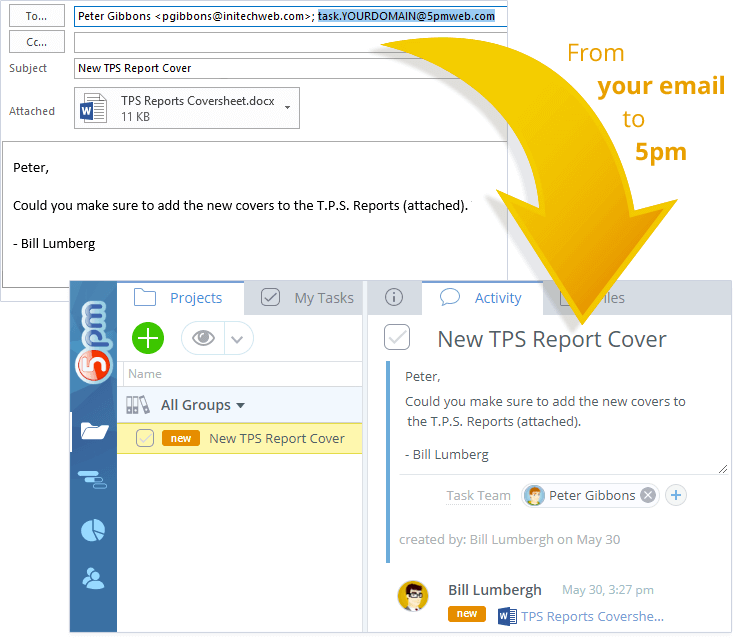
Here is an example of a task created from an email:
To create a Task from email, all you have to do is send it (To, CC or Fwd) to:
It will automatically detect the attachments, add recipients to the Task Team and so on!
For example, you can:
Send an email to
task.yourdomain@5pmweb.com to create a task
directly from email. If you include email addresses of other 5pm users (in To, CC or BCC) — they will be
added to the task team.
You can take an existing email, from your client, for example, and create a 5pm task from it by just
forwarding it to task.yourdomain@5pmweb.com.
Even more — you can also add Messages and Progress Notes directly from email!
v1
For this page for the old version of 5pm (v1)click here .